Listen before you save
Play any track in full, streamed from your own account, right where you found it. Nothing opens in a browser, nothing leaves the window.
A native desktop app for saving music from your own TIDAL account for offline listening: search-first, art-forward, and built for people who would rather work in a window than a terminal. Up to HiRes Lossless and Dolby Atmos, tagged and filed the way a library manager expects, by default.
Free and open source No telemetry, ever macOS · Windows · Linux
Waves lands on Browse, the same editorial front page TIDAL opens on.
One field searches artists, albums, tracks, videos, playlists and mixes at
once, and a pasted tidal.com link resolves straight to the
release. Results come back art-first, grouped by type, with color-coded
quality badges the whole way down.
Browse opens on TIDAL's editorial front page and stays current on its own. Leave Waves running for days and it quietly follows what TIDAL is featuring.
A proven engine, wrapped in the desktop app it never had. These are the parts that were missing.
Play any track in full, streamed from your own account, right where you found it. Nothing opens in a browser, nothing leaves the window.
Save a whole discography, and decide what counts as one, down to whether a guest appearance comes along for the ride.
When one edition has the bonus tracks and another the better master, Waves builds a single album taking each song at its best.
Every batch accounted for, including the failures, with one button to retry them all, and a failed release says how many songs were missed and out of how many. STOP keeps what it stopped, gathered in its own section rather than emptied out of the queue. No row ever just says "done": each one tells you what it fetched and what actually arrived.
Files land in Artist/[Year] Album/Disc-Track. Artist - Title, the structure Plex reads natively, and every part of that is yours to change.
Waves keeps its own receipt of every save, so a second pass at an artist fetches only what is missing. Raise the quality setting later and Waves offers to replace the older copies. A Dolby Atmos copy and a stereo one are kept side by side, so neither can ever land on top of the other.
Experimental, off by default. Point Waves at the music you already own and it stops offering you a second copy. Your files are only ever read: never written, moved or renamed.
Waves asks LRCLIB first and falls back to TIDAL, sidestepping the machine-transcribed lyrics TIDAL serves for many newer tracks.
A real video player, in the app, and a preview that plays the moment you hover a thumbnail.
A share that drops out mid-batch is waited for, and on macOS mounted back with the credentials already in your keychain, so the batch carries on where it stopped instead of failing every track left in it while you were asleep.
The one dependency, installed for you and checksum-verified, never something you have to go and find.
Off by default, never silent, and every build is signature-checked before it is allowed to replace the one you have.
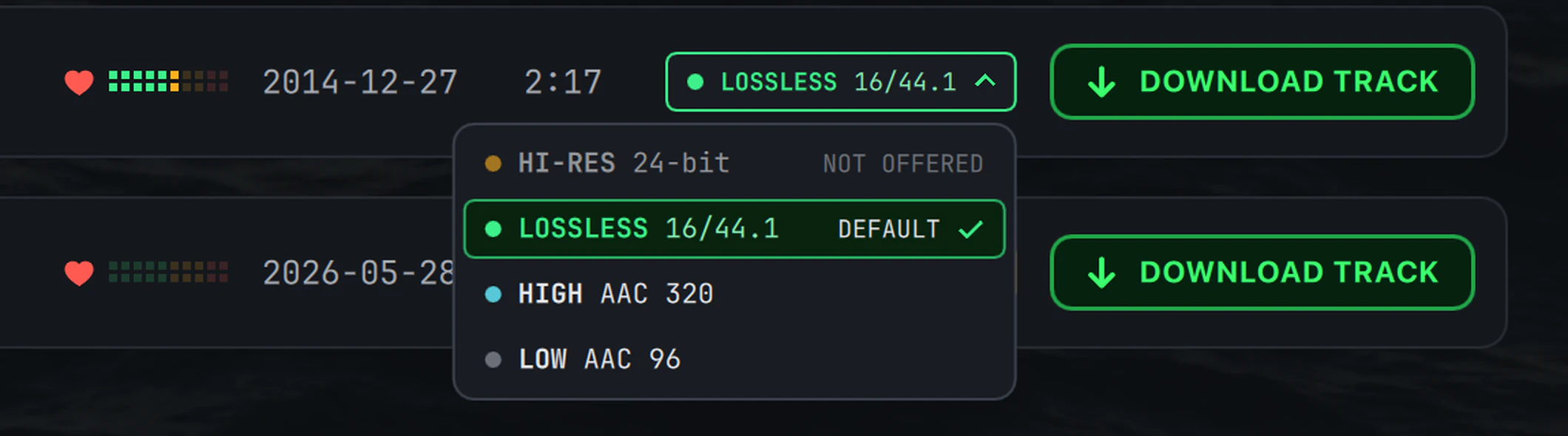
Waves never guesses. Every track, album and video shows the quality it will actually arrive at, in the same color-coded badge the app uses throughout. Every one of those badges is also a control: click it and pick a tier for that one album or song, without going near Settings.
The top tier TIDAL offers, and what Waves fetches when your Audio quality setting asks for it and the release has it. Tracks arrive as FLAC at the release's native depth and rate, and nothing is resampled or transcoded on the way unless you switch on Downsample hi-res FLAC yourself.
A new window on an engine that already worked. Where it did not, a handful of changes to the engine itself, each answering a problem someone actually hit.
A discography no longer pegs the CPU, and quit means quit, even halfway through a track.
A download that dies mid-flight leaves nothing behind in your library. Not a stub, not a truncated track that plays for ten seconds and stops.
Drawn in PySide6 / Qt Quick. No Electron, no bundled browser. Just one calm, dark console window that opens like any other desktop application.
No telemetry, no analytics, no tracking. By default Waves makes no unsolicited outbound connections at all. Beyond keeping Browse current, it talks to TIDAL only to do what you just asked it to.
Waves is a personal, non-commercial tool for reaching your own TIDAL account, using your own credentials, and it can only save what your account can play. It may not be used to infringe copyright, or to reproduce, distribute, or pirate any content. That is not a footnote buried in a license file: every install has to read it and agree to it before the app will do anything.
Waves is a personal, non-commercial tool for accessing your own TIDAL account. By continuing, you agree that:
Waves is not affiliated with, endorsed by, or sponsored by TIDAL. TIDAL is a trademark of its owner, used here only to identify the service Waves works with.
Waves does not collect any information from its users and has no way of knowing how the application is used. Privacy is the foundation of this application.
Terms v1.0 (10 August 2026)
Waves collects nothing, and I have no way of knowing how the application is used. There is no usage data, no account on my side, and nothing reported back. That is by design, and not an excuse. Anyone using Waves to infringe copyright is doing so against these terms and without my knowledge or consent.
The headline changes across the last few releases, newest first. Turn on update checks and Waves offers each new version from inside the app, so you never have to go hunting for it. Read the full changelog, or take the deep dive through everything the app does.
Click the quality badge on any album or song and choose a tier from the menu, with no trip to Settings. The badge keeps showing your choice, and that item keeps asking for it, until you pick another tier or close Waves; a choice made on an album applies to every song in it. The menu marks a tier you already hold at that quality, so you can see before you click that a save would only fetch it again.
With Most-complete edition only on, an artist page no longer lists an edition whose songs all sit inside a fuller edition of the same album, so the page shows exactly what DOWNLOAD DISCOGRAPHY would save. A new Settings switch, Show every edition on artist pages, lists them all again when you want the full picture.
Some shares hand back only part of a folder list on macOS, which used to leave albums you already had looking missing, and open to being fetched a second time. Waves now spots a short listing, finds the missing folders by name and reads the share again over a fresh connection. If your settings file is ever damaged mid-save, Waves sets the damaged file aside under its own name and starts on the defaults, instead of saving the defaults over your only copy.
STOP used to empty the queue. Now every row it ends stays in the queue, gathered into a Stopped section you can retry or clear in your own time, and it also ends a discography or editions scan that has not reached the queue yet. Signing out stops what is running the same way, instead of letting it fail one by one against the account you just left.
A playlist page has a DOWNLOAD FULL ALBUMS button that saves the complete album every song comes from, one copy per album however many of its tracks the playlist happens to list.
Search for a particular song, album, video or playlist and it is pinned as a Top result above every section, rather than sitting under the artists. Popularity is a sort of its own again beside Relevance, Release date and Name, and the sort you pick is remembered for next time. An artist search now keeps up to sixty matches, so a lesser-known artist who shares a name with a famous one can actually be found.
Queue tens of thousands of songs and the window stays as quick as it was with ten, and rows waiting their turn cost almost no memory until it comes. A long playlist no longer fails over one song TIDAL has taken down, a busy transfer waits and tries again when TIDAL asks it to slow down, and a release that fails says how many songs were missed, and out of how many.
Rest the pointer on a card, an artist or an album row and the page, its covers and its track list are ready before you click. Covers you have already loaded are kept, so a page you come back to draws at once, and a search Waves can already answer paints immediately and corrects itself when the full results arrive. Launch is quicker, a long session uses less memory, and the app is a smaller download that takes up less space once installed.
Every name below downloads that file from the newest release. Each one
ships with a SHA-256 checksum, and every release carries a signed
SHA256SUMS manifest. Recent builds shed the Qt components
Waves never loads, so the download is around 57 MB rather than 81 MB,
and the installed app about 145 MB rather than 175 MB.
| Platform | Intel / AMD (x64) | ARM (Apple silicon, etc.) |
|---|---|---|
| macOS 15+ | waves_macos-intel.zip |
waves_macos-apple-silicon.zip |
| macOS 12–14 | waves_macos-intel_legacy.zip |
waves_macos-apple-silicon_legacy.zip |
| Windows | waves_windows-x64.zip |
waves_windows-arm64.zip |
| Linux | waves_linux-x64.zipwaves_linux-x64.AppImage |
waves_linux-arm64.zipwaves_linux-arm64.AppImage |
brew tap iamprivacy/waves && brew install --cask waves
That cask is macOS only. Installed through it, Waves knows: the in-app
"Update & restart" button runs brew upgrade for you. On Linux, the
AppImage needs no unzip and no install step, and the in-app updater keeps it
current in place.
Every release carries two small files next to the builds: SHA256SUMS, one
line per file with its SHA-256, and SHA256SUMS.sig, an Ed25519 signature over
that file made with the Waves release key. The release page prints each file's hash next
to it. The public half of the key, compiled into every build and checked by the in-app
updater before it installs anything:
-----BEGIN PUBLIC KEY-----
MCowBQYDK2VwAyEAcetggrhiqyMN5HsBCi/f2gJL75FVPOYGU/sd4dI5b+0=
-----END PUBLIC KEY-----
macOS or Linux, from a folder holding the zip, SHA256SUMS and
SHA256SUMS.sig. The signature step needs OpenSSL 3: most current Linux
distributions ship it, and on macOS the built-in openssl is LibreSSL, which
cannot check it, so brew install openssl@3 and run the third line with
$(brew --prefix openssl@3)/bin/openssl in place of openssl.
printf '%s\n' '-----BEGIN PUBLIC KEY-----' 'MCowBQYDK2VwAyEAcetggrhiqyMN5HsBCi/f2gJL75FVPOYGU/sd4dI5b+0=' '-----END PUBLIC KEY-----' > waves-release.pem
base64 --decode < SHA256SUMS.sig > SHA256SUMS.sig.bin
openssl pkeyutl -verify -pubin -inkey waves-release.pem -rawin -in SHA256SUMS -sigfile SHA256SUMS.sig.bin
grep -v '^#' SHA256SUMS | tr -d '\r' | shasum -a 256 --ignore-missing -c -
The third line must print Signature Verified Successfully and the last one
<file>: OK for the zip you downloaded (without shasum, use
sha256sum). Any other output means the file does not match this release:
delete it and download again.
Windows (PowerShell), from the same folder, with
waves_windows-x64.zip replaced by the zip you downloaded. The two hashes must
be identical; to also check the signature, run the lines above in Git Bash with OpenSSL 3.
(Get-FileHash .\waves_windows-x64.zip -Algorithm SHA256).Hash.ToLower()
Select-String -Path SHA256SUMS -Pattern waves_windows-x64.zipFull notes, and the same steps kept in one place, in the README.
Everything above, told properly: screen by screen, with the loops and the settings names. Start anywhere.
Native on macOS, Windows and Linux. Nothing to buy, nothing to unlock, nothing collected.